Live voice changer
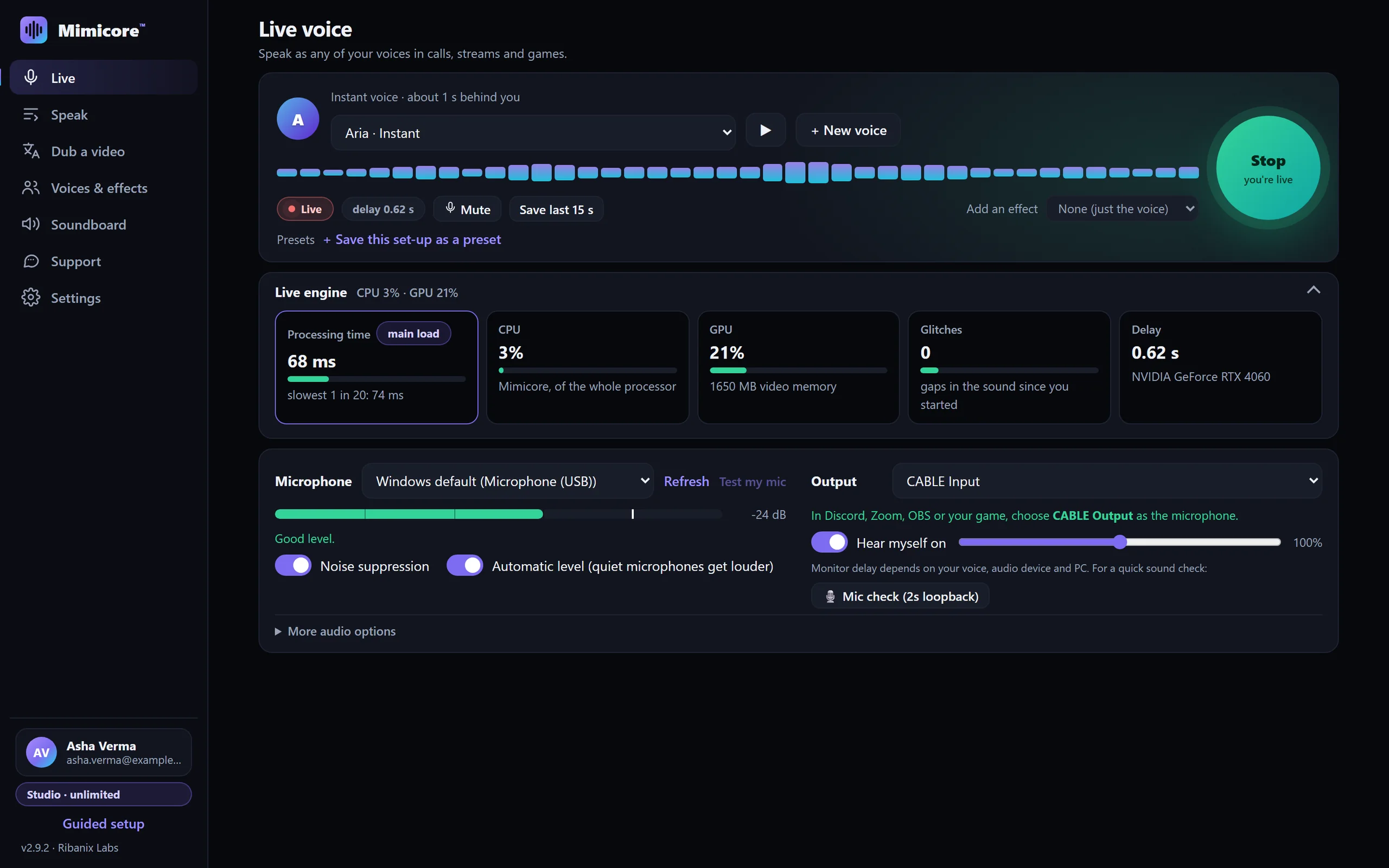
Talk in any of your voices in Discord, Zoom, OBS and games: trained voices at the lowest delay, instant and gallery voices with the free Instant live voices add-on. One-click virtual microphone setup.
Real-time voice changer, instant voice cloning, your own trained voices and text-to-speech in 23 languages — fast, private and running on your own PC.
Most voice changers keep the good parts behind a paywall or send your voice to a server. Mimicore runs on your PC, so the free plan can be generous.
| Tool | What it is | Price | Free option |
|---|---|---|---|
| Mimicore | Real-time AI voice changer and voice cloning that runs on your own PC (Windows, Mac beta). In the app, your voice is processed on your PC and is never uploaded. | Free forever. Studio is a low-cost upgrade. | All 28 effects, the soundboard, unlimited live AI voice with 19 gallery voices, 60 minutes a day with your own voice, one voice clone |
| MorphVOX Pro | Windows voice changer | Sold by the vendor; sales sometimes apply | See their site |
| Voice.ai | Voice AI platform (cloud credits) | Starter plan; voice clones start on paid plans | Free plan with monthly credits; no voice clones |
| ElevenLabs | Cloud text-to-speech and voice platform | Starter plan per their FAQ; first-month offers differ | Free plan with 10,000 credits a month (about 10 minutes of speech) |
| Voicemod | Real-time voice changer and soundboard (PC, Mac, mobile) | Pro is a paid upgrade; prices vary by plan and region, check voicemod.net | Free version with a limited choice of voices |
Competitor details and prices checked October 2026, from the vendors' own public pages. Plans, limits and prices change, so check their sites for current details. This is a factual comparison of published information, not a review.
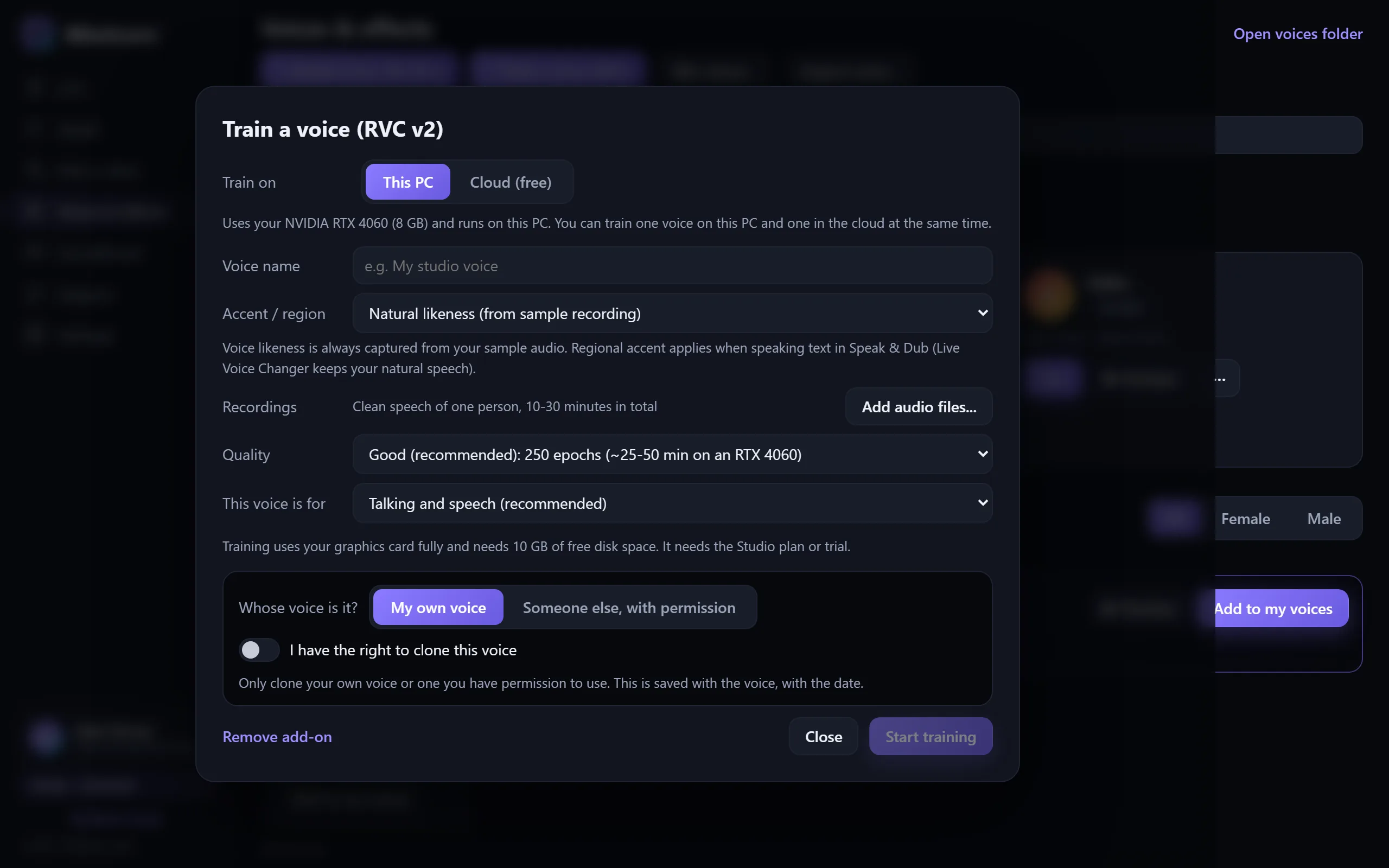
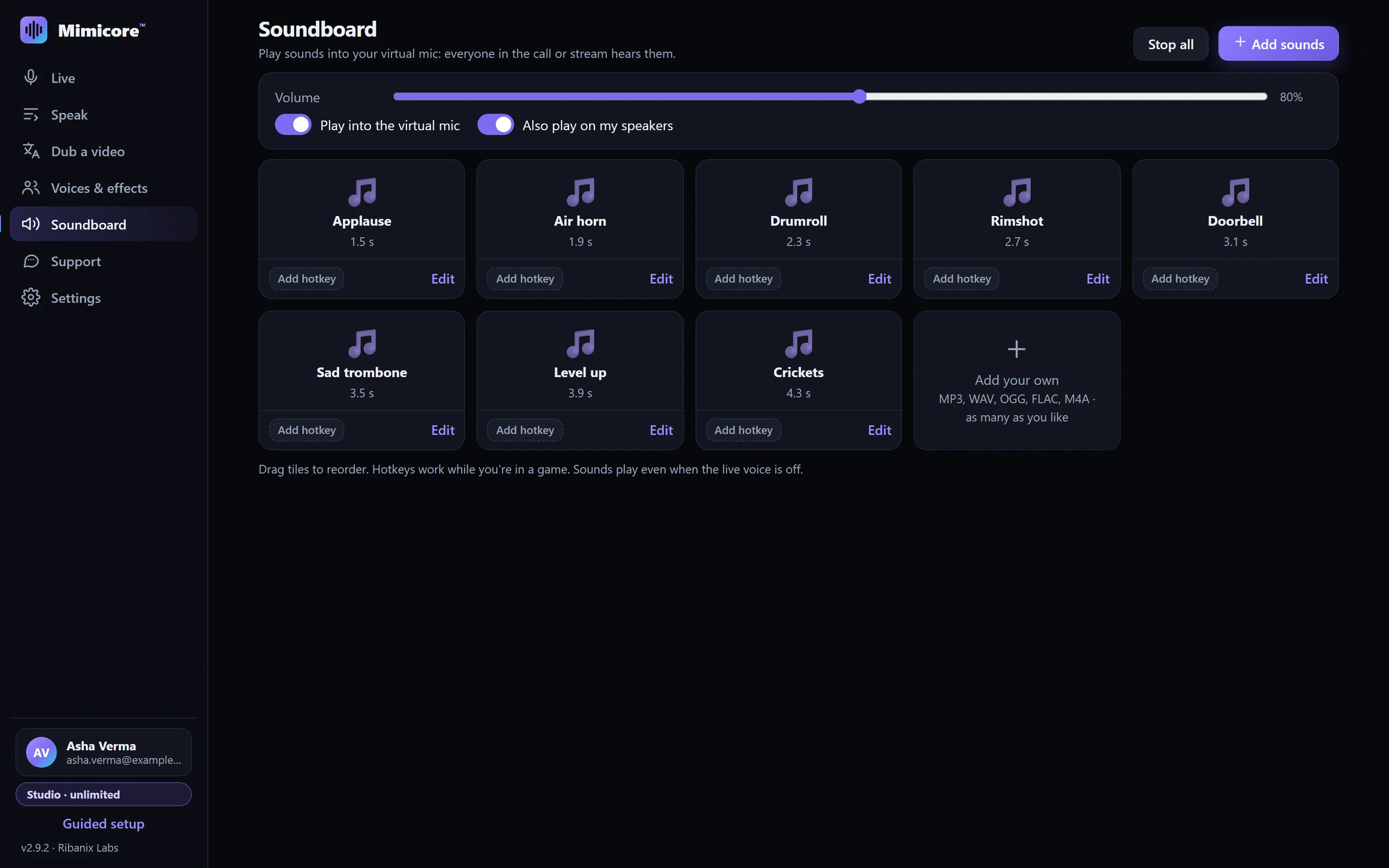
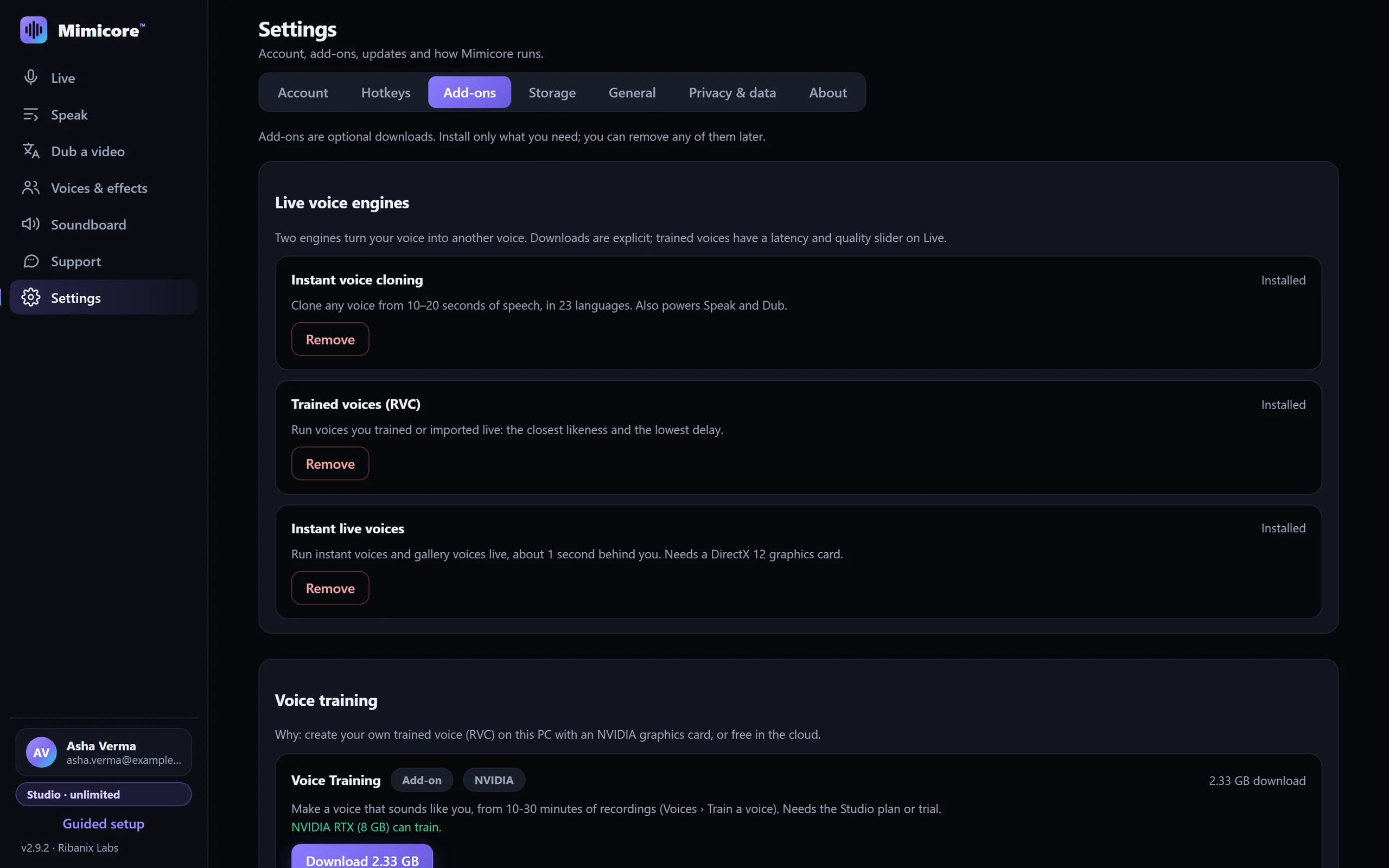
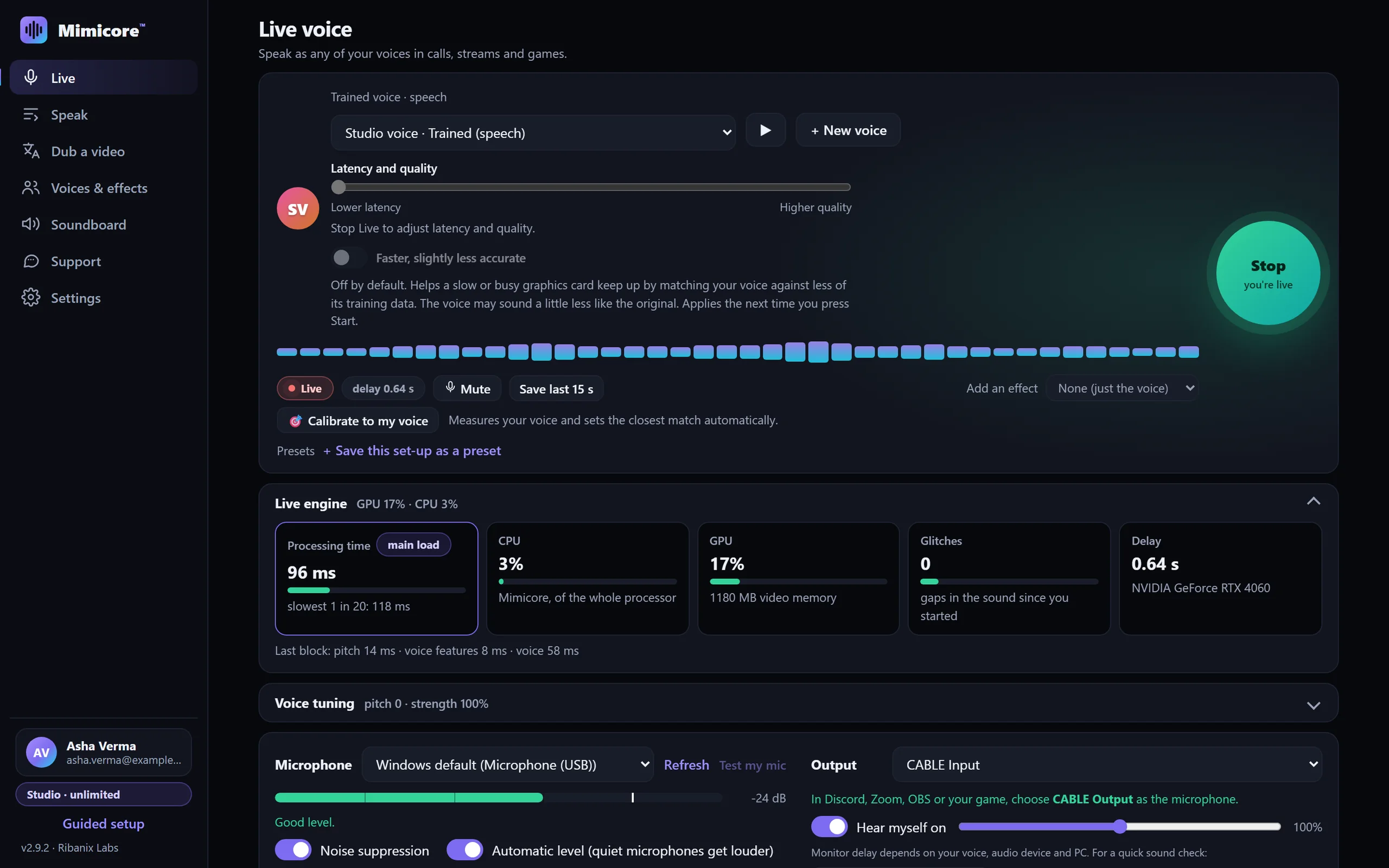
The real app, not a mock-up. Pick a screen.
Pick a voice, press Start, and talk in Discord, Zoom, OBS or your game. A latency and quality slider tunes trained voices from about 80 ms to 1.2 s.
One app for live voice, cloning, training, effects, soundboard and speech.
Talk in any of your voices in Discord, Zoom, OBS and games: trained voices at the lowest delay, instant and gallery voices with the free Instant live voices add-on. One-click virtual microphone setup.
Record 10–20 seconds of speech and get a voice in under a minute. No training, nothing uploaded. Use it live, in Speak, in Dub and for files.
Studio-grade likeness from 10–30 minutes of recordings: on your own NVIDIA GPU, or free on a Google GPU in your own account. The best checkpoint is picked for you.
Robot, demon, chipmunk, radio, cave and more. Instant, on any PC, no model download and no minutes used.
Start, mute, hold-to-talk and switch voices from inside your game, even when Mimicore is in the background.
Air horn, applause, drum roll and your own clips, as many as you like, played into your mic with one key.
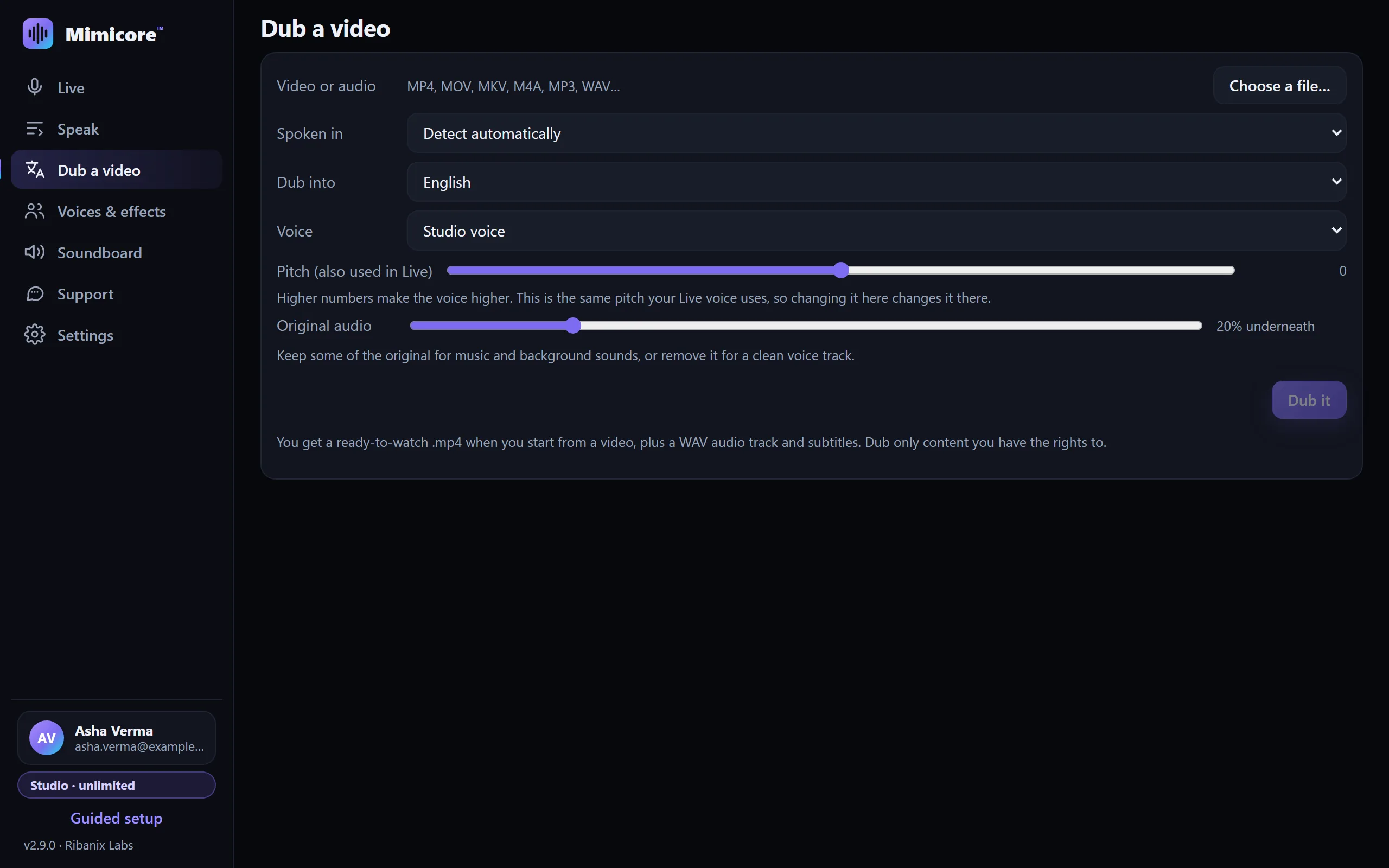
Turn a video's speech into Hindi, Spanish, Japanese and 20 more languages, spoken in your own voice, with subtitles. Fully offline.
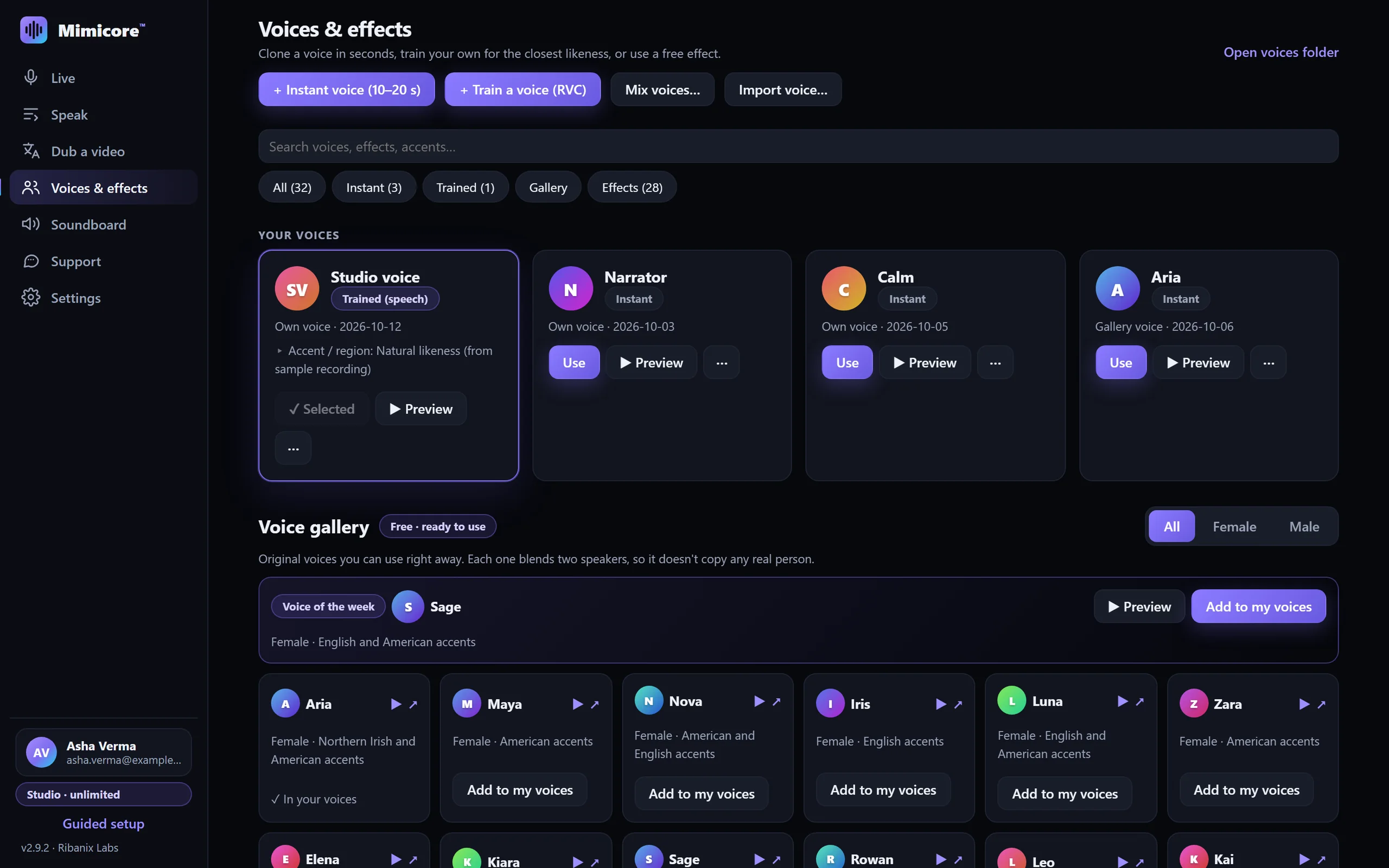
19 ready-made original voices, plus a mixer that blends any two of your voices into a brand-new one.
Import a PDF, Word file or scanned pages, split a book into chapters and render them in your voice. Scripts are saved on your PC as projects, and an interrupted render resumes from the last verified chapter.
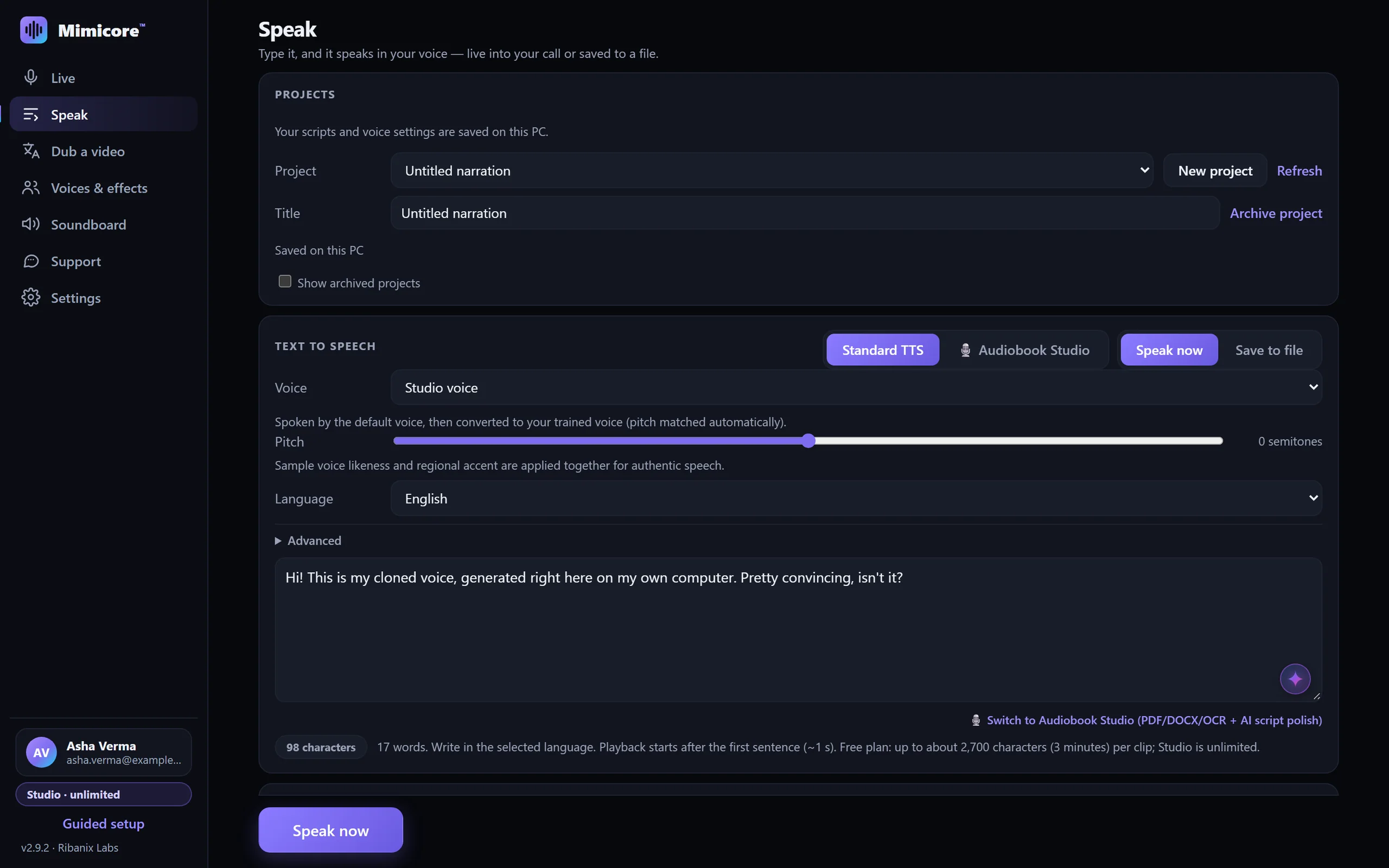
Type and it speaks in your voice — live into your call or saved to files. 23 languages with emotion and speed control, and an optional accent match for trained voices.
The app speaks English, हिन्दी, Español, Português, Français, Deutsch, Русский, 日本語 and Bahasa Indonesia.
In the Mimicore app, live voice, cloning, effects and speech run entirely on your PC and your voice is never uploaded. Optional cloud training uses your own Google Drive, never our servers.
Privacy isn't a setting in Mimicore. It's how it's built.
Live voice, instant cloning, effects, soundboard, text to speech and on-PC training run entirely on your computer. Your microphone audio is processed in memory and never stored or sent anywhere.
No NVIDIA GPU? Train in your own Google Drive and Colab. Mimicore can see only the folder it creates, the notebook is open source, and the files are removed when you're done.
Your account email, plan and minute balance, plus simple usage counters (which features you use and for how long; switch off in Settings). No audio, no voices and no recordings. Typed text stays on your PC too, with one exception: if you are signed in and use the optional AI script polish or random narration in Audiobook Studio, that script goes to our server and an AI provider to be written (you can use the built-in cleanup instead). Error reports are off unless you switch them on; early builds for testers (not the regular download) send technical diagnostics automatically, without audio, scripts or file, voice and device names.
Install Mimicore (about 22 MB), choose what you want to do, and it downloads only what that needs. It keeps itself up to date.
Clone one in seconds, train your own for the closest likeness, or start with a free effect.
Choose “CABLE Output” as the microphone in Discord, Zoom, OBS or your game — and talk.
Step-by-step guides · Any app that lets you pick a microphone can use it. Product names belong to their owners; Mimicore is not affiliated with them.
Mimicore picks the size that suits your PC when you install the instant-voice add-on; you can switch under Settings, Add-ons. Every size speaks 23 languages and converts your voice in any language you speak.
Lowest lag and graphics memory. For gaming and low-spec PCs.
1.1 GB downloadFast, natural speech and live voice. Best for most people.
1.3 GB download10-step decoder for the most polished speech and files.
1.8 GB downloadAdd-ons: Instant live voices, 0.5 GB, to run instant and gallery voices live on any DirectX 12 graphics card; Trained voices (RVC v2), 0.3 GB, for the lowest delay and the closest likeness; and Voice Training, 2.5 GB, to train your own voices on an NVIDIA GPU.
No AI model, no download, no minutes used. Pick one and go live instantly.
Free forever for everyday use. Studio adds your own voices with no daily limit, unlimited cloning and Dub with no clip limit.
Loading plans for your region…
On a Mac? The Mac beta is free for now: every feature, no plan needed.
You can sign in on as many PCs as you like; only one PC at a time can use the live voice and processing seat.
Yes. The Free plan is yours forever: all 28 effects and the soundboard, unlimited live AI voice with the 19 gallery voices, 60 minutes a day with your own voice and one voice clone of your own. Speak, Dub and file conversion handle clips of a few minutes. Studio removes every limit. Why so generous? Mimicore runs on your PC, so it costs us almost nothing to run.
Every new account gets 30 days of full Studio with no credit card or payment info, so you are never charged automatically. Use unlimited own-voice live, cloning, mixing, Dub and training right away. When the 30 days end you simply carry on with the Free plan, or choose Studio monthly, annual or for life. Outside India, Studio is currently free with no end date, as an Early Bird Gift, while international payments are being set up.
Yes. Every account has an invite code on its account page and in the app. A friend who enters it gets 2 extra free days; when that friend makes their first purchase you get 30 days of Studio, up to 6 times.
Never to us. Recording, cloning, live conversion, speech and on-PC training all run on your PC. If you choose cloud training, your recordings go only to your own Google Drive and a Colab session in your own Google account: Mimicore can see only the files it creates there, and they're moved to your Drive trash once the voice is installed. We store only your account email, plan and simple usage counters (features used and for how long, never content), which you can switch off in Settings.
Yes, since 2.9.2. Install the free Instant live voices add-on (Settings › Add-ons, about 500 MB). It runs on any DirectX 12 graphics card and plays about one second behind you. Trained voices stay the lowest-delay choice. Without the add-on, instant voices still work in Speak, Dub and file conversion.
Yes. Cloud training uses a free NVIDIA GPU from Google Colab in your own Google account: same trainer, same three quality levels, same result. Start it in the app (Voices › Train a voice › Cloud) or on the Cloud training page. Instant voices and all effects work on any PC without training.
Windows 10 or 11 (64-bit). A DirectX 12 graphics card from NVIDIA, AMD or Intel is recommended for live voices; effects run on any PC. Training your own voice needs an NVIDIA GTX 16 / RTX 20 series card or newer with 4 GB+.
Mimicore installs the free VB-CABLE virtual microphone for you with one click. Then pick “CABLE Output” as your microphone in the other app.
Yes. Dub a video transcribes the speech, translates it sentence by sentence and speaks it in your voice, fitted to the original timing. It runs fully offline with the free Dubbing add-on and gives you a WAV track plus SRT subtitles for any video editor.
Use Calibrate to my voice on the Live page: read one sentence and Mimicore sets the pitch and noise gate for the closest match, then remembers them for that voice.
Yes. Global hotkeys work while a game has focus: start/stop, push-to-talk, mute, switch voices and play soundboard sounds without leaving the game.
The user guide walks through every feature, with recipes for Discord, streaming, YouTube dubbing, voiceovers and private calls, plus troubleshooting.
Only your own voice, or a voice whose owner has given you permission. You confirm this when you accept the terms on the download page, and generated files are marked as AI-generated. Impersonation and fraud are forbidden by our Acceptable Use Policy.
Any time, on your account page under Your subscriptions. Cancelling during the trial ends it at once with nothing charged. Cancelling later stops renewal, and the plan keeps working until the end of the period you paid for.
More answers in the full help and FAQ and the step-by-step user guide.
Download Mimicore free for Windows 10/11 (64-bit). About 22 MB installer; guided setup downloads only what you choose. Updates install themselves. Prefer the Microsoft Store? It installs and updates the same app for you. You accept the terms here, once; the app never asks again.
Press the button and this page reads what your browser reports about this device. It all stays in your browser: nothing is sent, saved or tracked. A browser can only guess. It cannot read your video memory or exact Windows version. After installing, the app's own Check my setup (Support page) is the authoritative check.
For Apple Silicon Macs (M1 or newer, macOS 12 or later), free during the beta with every feature unlocked. The app is not notarized yet, so open it with right-click, then Open, the first time. Discord, Zoom and games need the free BlackHole 2ch driver, and Mimicore walks you through it. Live voice needs a fast Mac; effects, Speak, Dub and cloud training run on any.
Beta builds send diagnostic logs to us automatically so we can fix problems on Macs. They exclude audio and what you type, and you can switch this off in Settings. Details in the Privacy Policy.